01Problem问题
The question it answers它回答的问题
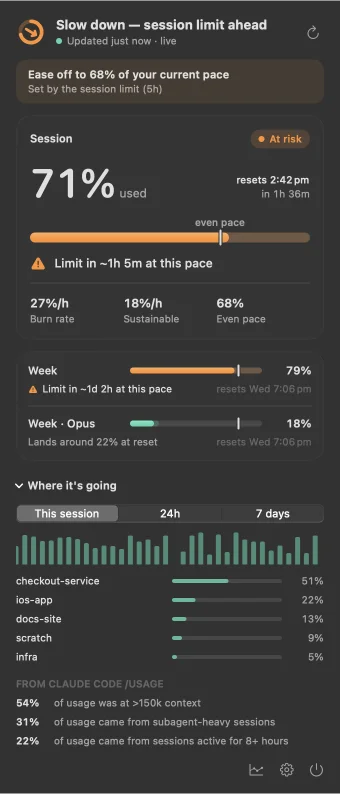
The decision is whether to keep going, pause, wait for the reset or switch to other work. Percent used does not answer that. Time to limit, projected % at reset and the sustainable rate do.要做的决定是:继续、暂停、等重置,还是换别的工作。已用比例回答不了这个问题,到达上限的时间、重置时的预计比例和可持续速率可以。
Claude Pro and Max plans limit usage in a 5-hour session window and a 7-day week window, and Claude Code also reports per-model weekly limits. Claude Code reports each as a percentage used and a reset time. A reading of 48% on its own says little: it is comfortable if the week resets tomorrow, and a problem if it resets in five days and usage is still climbing at the current rate.Claude Pro 和 Max 套餐按 5 小时 session 窗口和 7 天周窗口限制用量,Claude Code 还会报告分模型的周额度。Claude Code 对每个窗口给出已用比例和重置时间。单看「已用 48%」说明不了什么:如果周额度明天重置,这很宽裕;如果还有五天才重置、用量仍按当前速度上涨,就会不够用。
Someone running several agents at once needs the rate, not the level. For every window Pace shows:同时运行多个 agent 的人需要的是速度,而不是水位。Pace 对每个窗口给出:
- Time to limit: when usage reaches 100% at the current rate, shown only if that is before the reset.到达上限的时间:按当前速度何时用到 100%,只在早于重置时显示。
- Projected % at reset: where the window ends if the current rate continues.重置时的预计比例:保持当前速度,窗口结束时用到多少。
- Sustainable rate: percentage points per hour that land on exactly 100% at the reset.可持续速率:每小时用多少个百分点,正好在重置时用到 100%。
- Direction: speed up, on pace or ease off, from the ratio of the last two (section 03).方向:加速、保持或放慢,由后两者之比决定(见第 03 节)。
| Status状态 | Condition条件 |
|---|---|
| Comfortable | Projected below 85% at reset.预计重置时低于 85%。 |
| Watch | Projected to end at 85% or more.预计结束时达到 85% 或更高。 |
| At risk | At this rate the window hits 100% before the reset.按当前速度,重置前就会用到 100%。 |
| Limited | At the limit.已到上限。 |
The menu-bar icon, the cards and the notifications all derive from this one value, so they cannot disagree. An at-risk notification fires only when the limit is close enough to act on: under 2 hours away for the session, under 24 hours for the week, once per window instance.菜单栏图标、卡片和通知都由这一个值推出,因此不会互相矛盾。At risk 通知只在离上限足够近、还来得及调整时才发:session 不到 2 小时、周窗口不到 24 小时,每个窗口实例只发一次。
02Data sources数据来源
Three readings, no credentials三个读数,不碰凭据
Pace reads three things on the Mac: the output of Claude Code's /usage command, the rate_limits block Claude Code passes to its status line, and token counts in local transcripts. Pace opens no network connection itself. To answer /usage, Claude Code makes its own authenticated request, as it does when you type the command.Pace 在本机读取三样东西:Claude Code /usage 命令的输出、Claude Code 传给 status line 的 rate_limits,以及本地 transcript 里的 token 计数。Pace 自己不建立任何网络连接;回答 /usage 时,是 Claude Code 用它自己的登录发出认证请求,和你手动输入这个命令时一样。
A · The /usage probeA · /usage 探针
claude -p "/usage" --safe-mode \
  --no-session-persistence --output-format json
# num_turns: 0 · total_cost_usd: 0
/usage is a local command: Claude Code handles it without a model turn, so a reading costs $0. --safe-mode skips the user's hooks, MCP servers and plugins; --no-session-persistence keeps the run out of the transcript history. The child process gets a rebuilt environment (HOME, USER, TMPDIR, PATH, LANG, NO_COLOR) and an empty working directory, so it picks up no project settings. One run took about 2.6 s on my machine, so it runs every 5 minutes by default; after failures the interval doubles, up to 16 times./usage 是本地命令,Claude Code 自行处理,不经过模型,因此每次读数 $0。--safe-mode 不加载用户的 hooks、MCP server 和插件;--no-session-persistence 不留下 transcript。子进程使用重新构建的环境变量(HOME、USER、TMPDIR、PATH、LANG、NO_COLOR)和一个空的工作目录,不会读到任何项目设置。在我的机器上一次约 2.6 s,所以默认每 5 分钟一次;失败后间隔翻倍,最多 16 倍。
The output is text for humans. The parser is line-based: it reads the session, week and per-model week lines, resolves reset times such as resets Oct 14 at 5pm (Australia/Sydney) in the stated time zone, and infers the year. If no window line parses, Pace reports "unrecognised output" and shows no numbers. Real /usage output is checked in as a test fixture.输出是给人看的文字。解析器按行处理:读取 session、周和分模型周的行,按其中注明的时区解析 resets Oct 14 at 5pm (Australia/Sydney) 这类重置时间,并推断年份。一行窗口都解析不出时,Pace 报告「无法识别的输出」,不显示数字。真实的 /usage 输出作为测试 fixture 存在仓库里。
B · The status-line relayB · status line 中继
- Claude Code
- pace-bridge --chain
- your status line原有 status line
After every response Claude Code pipes a JSON blob to the configured status-line command; for subscribers it includes rate_limits.five_hour and seven_day. pace-bridge sits in front of the existing command, writes the snapshot atomically to a local file, then runs the original command with the same input and passes its output and exit code through. Connecting edits only the statusLine.command key of Claude Code's settings file, records the original command so Disconnect restores it, and refuses to touch a settings file that is not valid JSON.Claude Code 每次回复后,会把一段 JSON 交给配置好的 status line 命令;订阅用户的 JSON 里有 rate_limits.five_hour 和 seven_day。pace-bridge 接在原有命令前面,先把快照原子写入本地文件,再用同样的输入运行原命令,原样传回输出和退出码。连接时只修改 Claude Code 设置文件里的 statusLine.command 一个键,并记下原命令,断开时恢复;设置文件不是合法 JSON 时拒绝修改。
With several sessions open, each reports the rate_limits it saw at its own last response, so an idle session keeps sending an older, lower value. Usage within one window only goes up, so a lower reading of the same window instance refreshes the timestamp and keeps the higher value.同时开着多个 session 时,每个 session 报告的都是它最后一次回复时看到的 rate_limits,空闲的 session 会一直发送较旧、较低的数值。同一窗口内用量只增不减,所以同一窗口实例的较低读数只更新时间戳,保留较高的值。
C · Local transcriptsC · 本地 transcript
Claude Code writes each session to JSONL under ~/.claude/projects. Assistant lines carry token usage, the model, a timestamp and the working directory. The scanner keeps a byte cursor per file and reads only appended data, skips lines without both "type":"assistant" and "usage" before decoding JSON, and de-duplicates streamed messages on message and request id. It runs every 30 s. On my machine the first scan of a week (about 12,000 events) took about 3.5 s in a release build and an incremental pass about 12 ms.Claude Code 把每个 session 写成 ~/.claude/projects 下的 JSONL。assistant 行带有 token 用量、模型、时间戳和工作目录。扫描器为每个文件保存字节游标,只读追加的部分;在解码 JSON 之前,跳过同时不含 "type":"assistant" 和 "usage" 的行;按 message id 与 request id 对流式消息去重。每 30 s 扫描一次。在我的机器上,release build 首次扫描一周数据(约 12,000 个事件)约 3.5 s,之后每次增量扫描约 12 ms。
Tokens are not a limit percentage. Pace weights them roughly by relative API price (input 1, output 5, cache read 0.1, cache write 1.25 or 2, times a model-family factor) and only uses them in proportion to a live reading, as described in section 03.token 不是额度比例。Pace 大致按 API 相对价格加权(输入 1、输出 5、缓存读 0.1、缓存写 1.25 或 2,再乘模型系列系数),只与实时读数按比例换算使用,见第 03 节。
| Source来源 | Gives提供 | Freshness时效 | Failure mode失效方式 |
|---|---|---|---|
/usage | Used % and reset time for session, week and per-model week; Claude Code's usage findingssession、周和分模型周的已用比例与重置时间;Claude Code 的用量分析 | Every 5 min by default; ~2.6 s per run默认每 5 分钟;每次约 2.6 s | Format change: "unrecognised output", no numbers. Command error: retry with backoff.格式变化:报告无法识别,不显示数字。命令出错:退避重试。 |
| pace-bridge | 5h and 7d used % and reset time5 小时和 7 天的已用比例与重置时间 | After every Claude Code responseClaude Code 每次回复之后 | Subscribers only; absent until a session's first response; no per-model week; idle sessions send older values只对订阅用户;session 首次回复前没有;无分模型周额度;空闲 session 发送旧值 |
| TranscriptsTranscript | Weighted tokens per response, by project and model每次回复的加权 token,按项目和模型 | Scanned every 30 s, incremental每 30 s 增量扫描 | Not a percentage; only this Mac's sessions; ignored below 3% session usage不是比例;只含本机 session;session 已用低于 3% 时不采用 |
What Pace connects to. Nothing. The source has no networking code: no URL session, no sockets, no hard-coded URLs (searched on 21 October 2026). It starts subprocesses: claude for the probe and, only for the Spend feature in section 05, the herdr command-line tool. The /usage numbers come from a request Claude Code sends to Anthropic with the login it already holds. Pace never sees that login. "Pace makes no network request and holds no credential" is accurate; "Pace's readings involve no network traffic" would not be.Pace 连接什么。什么都不连。源码里没有网络代码:没有 URL session、没有 socket、没有写死的 URL(2026 年 10 月 21 日检索)。它只启动子进程:探针用的 claude,以及仅供第 05 节 Spend 功能使用的 herdr 命令行工具。/usage 的数字来自 Claude Code 用它已有的登录向 Anthropic 发出的请求,Pace 看不到这份登录。「Pace 不发网络请求、不持有凭据」是准确的;「Pace 的读数不涉及任何网络流量」则不准确。
03Forecast预测
Forecast and the Day Ring预测与 Day Ring
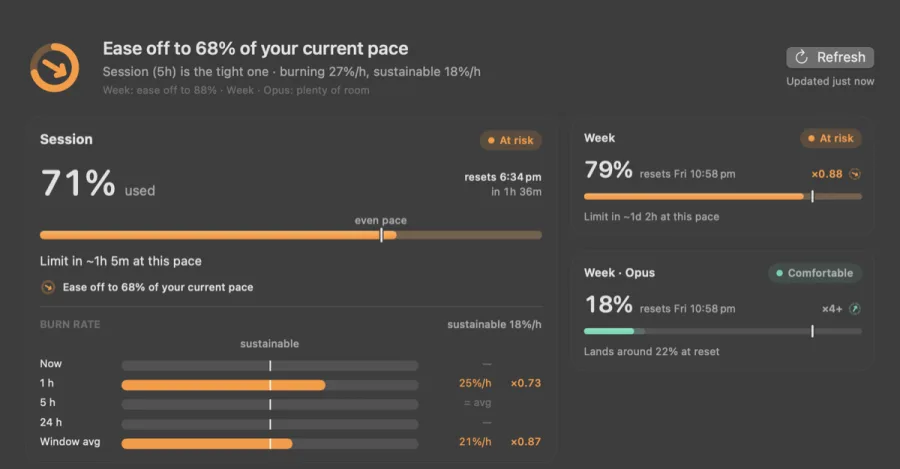
Each window gets used %, an even-pace marker, projected % at reset, time to limit and a sustainable rate. factor = sustainable ÷ current sets the direction, and the menu-bar Day Ring follows the window with the smallest factor.每个窗口都有已用比例、匀速标记、重置时的预计比例、到达上限的时间和可持续速率。factor = 可持续速率 ÷ 当前速率,决定方向;菜单栏的 Day Ring 跟随 factor 最小的窗口。
even pace     = elapsed / duration × 100
projected     = used + rate × hours_to_reset
time_to_limit = (100 − used) / rate
sustainable   = (100 − used) / hours_to_reset
factor        = sustainable / rate
# time_to_limit is shown only if it falls before the reset
Rates are percentage points per hour. Pace takes the first estimate below that has enough data, and shows no rate rather than guess:速率单位是每小时百分点。Pace 按下列顺序取第一个数据足够的估计;都不够时不显示速率,而不是去猜:
- Calibrated local activity, session only. Divide the session's observed percentage by the weighted tokens spent locally since the window started, then multiply by the weight of the last 20 minutes. The ratio is re-derived from every live reading, so weighting errors cancel. Needs at least 3% used. This is why the rate moves within about 30 s of a burst starting or stopping.本地活动校准,只用于 session。用 session 的观测比例除以窗口开始以来本地消耗的加权 token,再乘以最近 20 分钟的权重。比例在每次实时读数时重新计算,加权误差会互相抵消。要求已用至少 3%。这是突增开始或停止后约 30 s 内速率就能反映出来的原因。
- Recent slope: a least-squares fit over the last 45 minutes for the session (at least 8 minutes of span) or the last 24 hours for the week (at least 6 hours).近期斜率:对 session 最近 45 分钟(跨度至少 8 分钟)、对周窗口最近 24 小时(跨度至少 6 小时)的读数做最小二乘拟合。
- Window average, once 15% of the window has elapsed.窗口平均,窗口过去 15% 之后才使用。
Direction and the Day Ring方向与 Day Ring
- Ease off · below 1, the same condition as at risk放慢 · 低于 1,与 At risk 条件相同
- On pace · 1 to 1.25, arrow level保持 · 1 到 1.25,箭头水平
- Speed up · 1.25 or more加速 · 1.25 及以上
A factor of 2 means you could go twice as fast and still land on 100% at the reset. Both windows constrain you at once, so the direction follows the window with the smallest factor; to stop flicker, the binding window changes only when another is at least 10% tighter. The Day Ring's arc shows how much of that window is used: a continuous ring for the session, seven segments for the week. The arrow's angle follows the factor on a log scale (±60° at 4× or ¼×), stays flat inside the on-pace band and jumps to ±20° outside it, the smallest tilt that reads at menu-bar size. Since v0.7.0 the menu bar can also show the session and week rings, percentages and reset countdowns, the pace headroom and the sessions left this week; each item can be switched on or off and reordered.factor 为 2 表示可以快一倍,仍正好在重置时用到 100%。两个窗口同时约束你,所以方向跟随 factor 最小的窗口;为避免来回跳动,只有另一个窗口紧至少 10% 时才切换。Day Ring 的弧表示该窗口已用多少:连续圆环代表 session,七段圆环代表周。箭头角度按对数刻度跟随 factor(4× 或 ¼× 时为 ±60°),在保持区间内水平,离开区间立刻跳到 ±20°,这是菜单栏尺寸下能看出倾斜的最小角度。v0.7.0 起,菜单栏还可以显示 session 和周的圆环、百分比、重置倒计时、pace 余量和本周剩余 session 数;每一项都可以单独开关和调整顺序。
Dashboard面板
⌘D opens the dashboard: each window's burn rate now, over 1 h, 5 h and 24 h, and the window average, all against the sustainable rate, so a short burst and a long habit look different. It also draws usage over the window with the even-pace line and the projection, local activity by project and model, and the usage findings Claude Code's /usage reports. Since v0.7.0 either axis of the usage chart can be zoomed with a pinch.⌘D 打开面板:每个窗口当前、1 小时、5 小时、24 小时和窗口平均的消耗速度,都与可持续速率对比,短暂突增和长期习惯一眼可分。面板还画出窗口内的用量曲线、匀速线和预测线,按项目和模型的本地活动,以及 Claude Code /usage 给出的用量分析。v0.7.0 起,用量图的两个坐标轴都可以用双指捏合缩放。
Projecting from a chosen stretch按选定时段做预测
On the dashboard chart you can select a stretch of readings and project the window from it with four methods. A projection needs at least two readings over at least 5 minutes. If the stretch contains a drop of 10 points or more (an early reset), only readings after it count. A negative trend is treated as "not climbing" (rate 0). If a planned reset comes before the window's own reset, the projection ends there.在面板图表上可以选一段读数,用四种方法据此预测窗口。预测至少需要 5 分钟内的两次读数。若这段里有 10 个百分点以上的下降(提前重置),只用下降之后的读数。负趋势视为「没有上涨」(速率为 0)。如果计划中的重置早于窗口本身的重置,预测截止到计划重置。
| Method方法 | Rate速率 | Band区间 |
|---|---|---|
| Average平均 | First to last reading, idle time included首尾读数之差,含空闲时间 | None无 |
| Linear trend线性趋势 | Least-squares slope最小二乘斜率 | Slope ± 1.96 standard errors斜率 ± 1.96 个标准误 |
| Robust trend稳健趋势 | Theil–Sen: median slope of all reading pairsTheil–Sen:所有读数对斜率的中位数 | 10th–90th percentile of pair slopes读数对斜率的第 10–90 百分位 |
| Recent-weighted近期加权 | Weighted least squares, half-life ⅓ of the stretch加权最小二乘,半衰期为时段的 ⅓ | None无 |
Reading the band. The linear band is a 95% confidence interval for the fitted slope, assuming readings scatter independently around a straight line. Cumulative usage readings are not independent, and later usage depends on what the user does next, so the range drawn from it is a projection at the pace of the selected stretch, not a bound on where the window ends.如何理解这个区间。线性区间是拟合斜率的 95% 置信区间,前提是读数围绕一条直线独立分布。累计用量读数并不独立,之后的用量也取决于用户接下来怎么用,所以由它推出的范围是按选定时段节奏做的预测,不是窗口最终用量的上下界。
04Resets重置
Scheduled, planned and early resets按时、计划与提前重置
Pace handles scheduled, planned and early resets, and keeps readings from before a reset out of the slope after it.Pace 处理按时重置、计划重置和提前重置,重置前的读数不会进入重置后的斜率。
A window instance is its kind plus its reset time, matched within 5 minutes. History is keyed by window and reset time, so readings from before a reset never enter the slope after it. History is kept for 8 days; an unchanged status-line value is written again only as a 10-minute heartbeat.窗口实例由窗口类型和重置时间确定,重置时间相差 5 分钟以内视为同一实例。历史按窗口和重置时间分开存放,所以重置之前的读数不会进入重置之后的斜率。历史保留 8 天;status line 的值不变时,只以 10 分钟一次的心跳重新写入。
- Planned resets. The user enters a date and a scope (all limits, session or weekly). If it falls before a window's own reset, the forecast horizon moves to that date, so the forecast aims to use the remaining quota by then. This is a local plan; Pace cannot obtain or apply a reset.计划重置。用户输入日期和范围(全部、session 或周额度)。如果它早于窗口本身的重置,预测终点就移到这个日期,预测按届时用完剩余额度来计算。这只是本地计划,Pace 无法获取或执行重置。
- Saved resets. The user keeps a count of resets saved for later. Redeeming one decrements the count, tells Pace to accept the next lower reading at once and re-reads usage. Without that step the drop would look stale, because the weekly reset time does not change.保存的重置。用户记录手上存着几次重置。使用一次时计数减一,Pace 立刻接受下一次较低的读数,并重新读取用量。没有这一步,用量下降会被当作旧读数,因为周额度的重置时间不变。
- Early resets. Within one instance, a drop of 10 points or more is held until a second reading at least 60 s later agrees within 3 points. Otherwise the lower value is treated as stale.提前重置。同一实例内下降 10 个百分点或以上时,先暂存,等至少 60 s 后的第二次读数确认(相差 3 个百分点以内)才接受,否则当作旧读数。
05Privacy隐私
Data boundary数据边界
No analytics, no update pings, no account or browser credentials. Pace reads local files and Claude Code's output, and keeps what it stores in its own folder on the Mac.没有统计,没有更新检查,不读取账户或浏览器凭据。Pace 读取本地文件和 Claude Code 的输出,存储的数据都放在本机它自己的文件夹里。
| PacePace | What内容 |
|---|---|
| Reads读取 | /usage output; the status-line snapshot written by pace-bridge; assistant lines in Claude Code transcripts (tokens, model, time, working directory); the statusLine.command key of Claude Code's settings, only on Connect and Disconnect/usage 输出;pace-bridge 写下的 status line 快照;Claude Code transcript 中的 assistant 行(token、模型、时间、工作目录);Claude Code 设置里的 statusLine.command,只在连接和断开时 |
| Does not read不读取 | Browser cookies, the Keychain, Claude Code's stored login; no password, cookie, API key or OAuth token浏览器 cookie、钥匙串、Claude Code 保存的登录;不碰任何密码、cookie、API key 或 OAuth token |
| Writes写入 | Its Application Support folder: history.jsonl (8 days), the status-line snapshot, the reset plan, the bridge binary, the original status-line command and an empty probe directory它的 Application Support 文件夹:history.jsonl(8 天)、status line 快照、重置计划、bridge 程序、原 status line 命令和一个空的探针目录 |
| Sends发送 | Nothing. Claude Code's own request when it answers /usage belongs to Claude Code, made with its own login不发送任何东西。Claude Code 回答 /usage 时发出的请求属于 Claude Code,使用它自己的登录 |
The first version of Pace read the session cookie from the browser and called a private usage endpoint with it. Version 2 was rebuilt around the rule that Pace never sees a credential, and every source in section 02 follows from that rule.Pace 第一版从浏览器读取 session cookie,再用它调用一个非公开的用量接口。第 2 版围绕「Pace 永远不接触凭据」这条规则重写,第 02 节的每个数据源都由此而来。
Herdr SpendHerdr Spend
Released in v0.7.0. When at least 10 session points (percent of one 5-hour session) can still be spent before the session resets without running the week dry, the popover offers a "Spend spare quota" window. There the user picks tasks and projects, and Pace starts Claude Code or Codex agents in Herdr, a terminal multiplexer for coding agents, through its command-line tool. This feature consumes quota by design, and the agents it starts make their own network requests. It starts agents only for tasks the user schedules, every batch starts with a click, each job runs in its own Herdr pane on a new branch, and none merges, pushes to main or deploys. It does nothing if Herdr is not installed.v0.7.0 起正式发布。当 session 重置前还能多用至少 10 个 session 百分点(一个 5 小时 session 的百分比)、且不会耗尽周额度时,弹出面板会提供「Spend spare quota」窗口。用户在那里选择任务和项目,Pace 通过 Herdr(一个面向编码 agent 的终端复用器)的命令行工具启动 Claude Code 或 Codex agent。这个功能本来就会消耗额度,它启动的 agent 会发出各自的网络请求。它只为用户安排的任务启动 agent,每批任务都由用户点击启动,每项任务在单独的 Herdr pane 和新 branch 上运行,不会 merge、推到 main 或 deploy。没有安装 Herdr 时什么也不做。
06Release发布
Shipping status发布状态
The site and a DMG are public. Pace runs on Apple silicon Macs with macOS 14 or later; an open-source release is planned.网站和 DMG 已公开。Pace 支持 macOS 14 及以上的 Apple silicon Mac,计划开源。
Requirements: macOS 14 or later on an Apple silicon Mac, and Claude Code installed and signed in with a Pro or Max plan. The current build is ad-hoc signed, so macOS asks for a one-time approval on first open.运行要求:macOS 14 或更高的 Apple silicon Mac,已安装 Claude Code 并用 Pro 或 Max 套餐登录。当前 build 为 ad hoc 签名,首次打开时需要在系统里允许一次。
The build script compiles the app and pace-bridge in release mode, assembles the bundle and signs it ad hoc by default. With a Developer ID identity set it adds the hardened runtime and a secure timestamp, and --dmg packs a compressed disk image.构建脚本以 release 模式编译 app 和 pace-bridge,组装 app bundle,默认使用 ad hoc 签名。设置 Developer ID 身份后,会加上 hardened runtime 和安全时间戳;--dmg 打包成压缩磁盘映像。
- Technical article dated.技术文章定稿日期。
- v0.6.0 DMG built; ad-hoc signed.构建 v0.6.0 DMG,ad hoc 签名。
- Site and DMG online;
swift test: 87 passed, 2 live tests skipped.网站和 DMG 在线;swift test:87 项通过,2 项真机测试跳过。 - v0.7.0: Spend, range projection, chart zoom, planned and banked resets, menu bar items.v0.7.0:Spend、区间预测、图表缩放、计划重置与积攒的重置、菜单栏项目。
- v0.7.1: Spend scheduling fixes; the live DMG reports 0.7.1.v0.7.1:修复 Spend 调度;线上 DMG 版本号为 0.7.1。
- Developer ID signing, notarisation and stapling.Developer ID 签名、公证与 staple。
- Licence file and a public repository.许可证文件和公开仓库。